|
AKJ7803
- Singer's PowerTM
III
All-In-One Karaoke System
w/Flat Panel Monitor Holder and DVD/CDG/VCD/CDR/SVCD/CD
Player
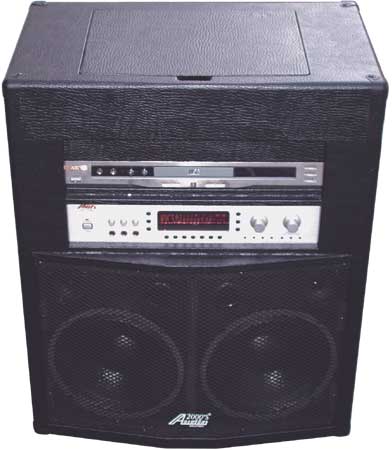
The Audio2000'S®
AKJ7803 Singer's PowerTM
III All-In-One karaoke system is a complete
karaoke system with a built-in flat panel monitor
holder, DVD/CDG/VCD/CDR/CD-RW/SVCD/CD player,
a karaoke mixing amplifier, a pair of 10-inch woofers, a pair of 3 1/2"
tweeters, a rugged wooden case and heavy-duty casters. Intended to be
a solution provider for various application environment, the AKJ7803
system is developed to provide the following benefits to the users:
| Friendliness: |
The flat panel monitor displayholder,
mounted on a retractable flap on the top of the AKJ7803,
makes the Singer's PowerTM
III All-In-One karaoke system ready to
have the flat panel monitor mounted at any time. |
| Dependability: |
The AKJ7803
system has been designed and manufactured to be dependable, problem
free, versatile and easy to use. |
| Portability: |
A set of heavy duty casters are
included so that the AKJ7803 system can be
moved easily from one location to another. |
| Quality: |
The karaoke mixing amplifier in the
AKJ7803 comprises a built-in 300W
amplifier, three microphone inputs, four audio inputs, one pre-amp
output, one subwoofer output, digital key controls, and digital echo
controls. The stereo speakers driven by the 300W amplifier deliver a
true-stereo, transparent and powerful sound wave capable of deeply
penetrating through a wide area of karaoke audience and karaoke
participants. |
| Affordability: |
The AKJ7803
system is intended to be readily accessible to everyone with
exceptional performance at a preferred and affordable price. |
APPLICATIONS
Public entertainment facility, church, school,
restaurant, karaoke box, home entertainment or other group events.
FEATURES
1. DVD/CDG/CDR/VCD/SVCD/CD Player
2. 150W + 150W Max. Power Output (8 Ohms)
3. Digital Signal Processor (DSP)
4. Three Microphone Inputs
5. Master & Individual Microphone Volume Controls
6. Microphone Tone Control (Treble/Bass)
7. Music Balance, Treble, and Bass Controls
8. Digital Key Controller (+/- 8 Steps)
9. V.F.D. Display
10. MULTI AUDIO and VOCAL CHANGE Karaoke Function
11. Three Channel VIDEO and AUDIO Inputs
12. One Video Output and One Sub-Out
13. One Tape-In and One Tape-Out
14. Clock, Wake-Time and Sleep-Time Settings
15. Digital Echo Volume/Delay/Repeat Controls
16. S-Video Output, Component Video Outputs, Optical Output
|
SPECIFICATIONS
|
OUTPUT POWER RATING |
300W,Max (150W/Channel, Max.; 80W/Channel, RMS) |
INPUT
SENSITIVITY |
MICROPHONE--- 75 dB
DVD--- 40 dB
TV--- 40 dB
TUNER--- 40 dB
TAPE IN--- 40 dB |
PRE-AMP
OUTPUT LEVEL |
4V @
10K Ohms |
S/N RATIO |
90 dB |
TONE CONTROL |
±12dB |
MUSIC KEY CONTROL |
±8 Steps(±1/4
Key/Step) |
TOTAL HARMONIC DISTORTION (T.H.D.) |
<0.1% (@ 1 KHz) |
FREQUENCY RESPONSE |
30 – 20,000 Hz (+/- 1 dB) |
ECHO VOLUME CONTROL |
0 – 40 dB |
WEIGHT |
75 lbs |
DIMENSION (W X D X H) |
|
|
|
SYSTEM OPERATION
- The AKJ7803 Singer’s Power IIITM all-in-one karaoke system consists of a built-in cross-over
circuit and a speaker case which includes two chambers to hold a DVD/CDG/VCD/CD player
and a karaoke mixing amplifier, AKJ7046.
- After the AKJ7803 Singer’s Power IIITM all-in-one karaoke system is removed from the shipping carton,
check to make sure the AC Voltage Selection switch on the AKJ7046 karaoke mixing amplifier
is set to the proper voltage for your area (115V/60Hz for the North America Area) before
plugging in the AC cord to the AC power outlet. (CAUTION:
UNPLUG THE AC CORD FROM THE AC POWER OUTLET BEFORE RESETTING THE AC VOLTAGE SELECTION
SWITCH.)
- One the AKJ7046, there are four audio inputs (DVD, TV, Tuner and
Tape) on the rear panel. The DVD audio
input is connected to the audio output of the DVD player. The other three audio inputs can
be connected to the other audio signal sources, such a VCD player, a CDG player, a CD
player, or a VCR player.
- There are three video inputs (DVD, TV, and Tuner) on the rear
panel of the AKJ7046. The DVD video input is
connected to the composite video output (a yellow RCA connector) of the DVD player.
The other two video inputs can be connected to the other video signal sources, such
a VCD player, a CDG player, or a VCR player.
- The Sub-Out output can be connected to a subwoofer amplifier.
- Check to make sure that the Pre-out jacks are connected, through
the U-shaped connectors, to the Main-in jacks. (Note: There are two U-shaped connectors.
The first U-shaped connector is to be connected from the red Pre-out jack to the red
Main-in jack. The second U-shaped connector is to be connected from the white Pre-out jack
to the white Main-in jack.)
- Connect the Tape-Out output to the input of a tape recorder, if
any.
- Connect appropriate numbers of microphones to the microphone
inputs.
- Check the speaker selection button to make sure it is preset to
speakers A.
- Turn on the power of the AKJ7046 and turn on the power of the
DVD player. Refer to the DVD player user’s manual for the DVD player operation
details.
-
Connect the AKJ7803 to a
display monitor.
- Place two AAA batteries to the battery compartment of the remote
control commander. Follow the battery
polarity instructions indicated in the battery compartment chamber.
- Adjust the clock setting with the T-MODE button.
- Set the Source selection button to DVD. Adjust the volume
control, tone control, key control and/or echo control knobs as necessary to have the
optimal volume and sound quality.
- Start to enjoy the AKJ7803 Singer’s Power IIITM all-in-one karaoke system.
BACK TO TOP
|
